



Introduction
This is the second part of my React performance optimization breakdown.
In the first article, I focused on the runtime problems in the dashboard: rendering thousands of table rows, calculating expensive values during render, and filtering users too aggressively on every keystroke.
In this continuation, I’ll focus on the next layer of optimization: reducing unnecessary re-renders, lazy-loading non-critical UI, fixing Recharts layout issues, and removing heavy chart code from the initial bundle. In short forms: Code Splitting, Lazy Loading, and Bundle Optimization
The biggest improvement in bundle size came from changing when the dashboard loads expensive UI. Instead of loading everything upfront, the optimized page delays charts and modal code until the user actually needs them.
This article continues from Part 1, where I covered virtualization, expensive render calculations, and filtering optimization.
If you have not read it yet, start here: Part 1: Rendering, Virtualization, and Expensive Computations
Problem 4. Stable Callback Problem
The heavy page passed an inline function to the table.
This is visible in the heavy main page image, see reference: Heavy Main Page.
<HeavyUsersTable
  users={filteredUsers}
  onSelectUser={(user) => setSelectedUser(user)}
/>
This creates a new function every time the parent component renders.
That might look harmless, but it matters when the child component is memoized.
React compares props by reference. A new function is a new reference.
So even if the logic is the same, React sees a different onSelectUser prop on every render.
Solution 4. Solving Callback Instability With useCallback
The optimized main page uses useCallback.
const handleSelectUser = useCallback((user: User) => {
  setSelectedUser(user);
}, []);
Then it passes the stable function to the table:
<OptimizedUsersTable
  users={filteredUsers}
  onSelectUser={handleSelectUser}
/>
see full code here: Optimized Main Page.
What this does
useCallback memoizes the function reference.
The empty dependency array means the function is created once and reused across renders.
}, []);
This is safe here because setSelectedUser is stable across renders.
Why this matters
The optimized table is exported with memo.
export default memo(OptimizedUsersTable);
React.memo can skip re-rendering a component if the props did not change.
But for that to work well, props need to be stable.
By using useCallback, the table receives the same function reference across renders.
Callback impact
| Before                            | After                              |
| ----------------------------------| ---------------------------------- |
| New function on every render      | Stable function reference          |
| Memoization becomes weaker        | `React.memo` can work better       |
| Child may re-render unnecessarily | Child can skip unnecessary renders |
This is not always the biggest optimization by itself, but it supports the rest of the performance strategy.
Problem 5. Lazy Loading the Modal
The heavy page imported the modal immediately.
This is visible in the heavy main page image.
import UserModal from "@/components/UserModal";
The problem is that the modal is not needed during the initial page load.
It is only needed when a user clicks the View button.
In this demo, the modal is small. But in real applications, modals often contain heavier logic:
- forms
- validation libraries
- date pickers
- file uploads
- payment widgets
- rich text editors
Loading that code upfront is wasteful if the user never opens the modal.
Solution 5. Solving Modal Cost With Dynamic Import
The optimized main page lazy-loads the modal.
const UserModal = dynamic(() => import("@/components/UserModal"), {
  ssr: false,
});
see code reference here: Optimized Main Page.
What this does
dynamic(() => import("@/components/UserModal"))
This tells Next.js to split the modal into a separate JavaScript chunk.
The modal no longer has to be part of the initial page bundle.
ssr: false
This prevents server-side rendering for the modal.
Since the modal depends on client-side interaction, it can safely load on the client.
Modal impact
| Before                              | After                      |
| ------------------------------------| ------------------------   |
| Modal code included upfront         | Modal code split out       |
| User pays for modal before using it | Modal loads when needed    |
| Larger initial bundle               | Smaller initial route cost |
Problem 6. Recharts Layout Problem
The heavy chart used Recharts.
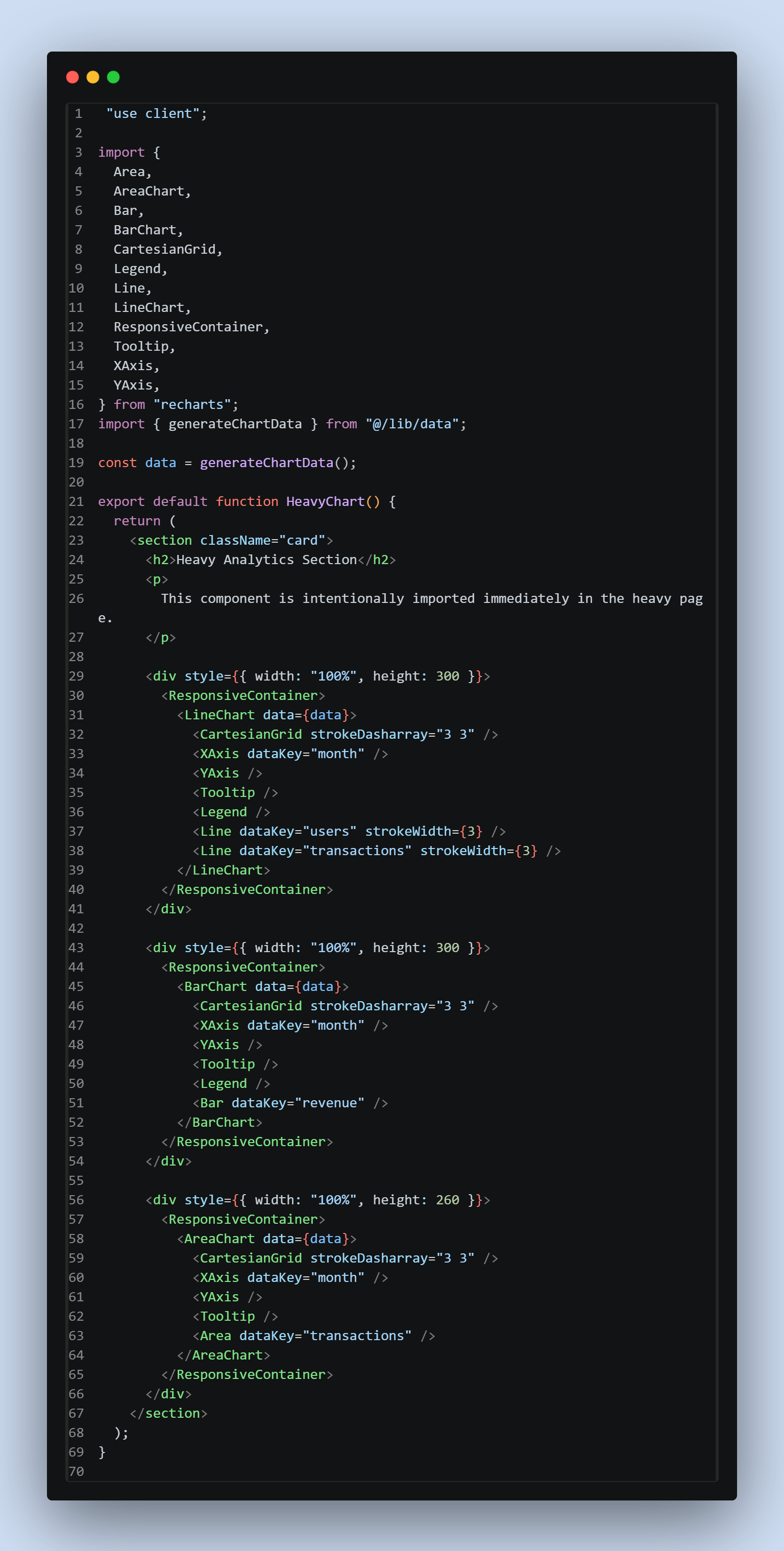
The problem was not only that Recharts was heavy. There was also a layout issue with ResponsiveContainer.
The heavy chart used a container like this:
<ResponsiveContainer>
  <BarChart data={data}>
    {/* chart content */}
  </BarChart>
</ResponsiveContainer>
This caused a warning like:
width(-1), height(-1)
Why this happens
Recharts needs to measure the parent container to calculate the chart size.
If the parent does not have a stable width and height during render, Recharts may fail to calculate proper dimensions.
This can happen during:
- prerendering
- hydration
- responsive layout calculation
- parent layout instability
Solution 6. Fixing Recharts Layout Stability
The optimized chart gives the parent container a stable size.
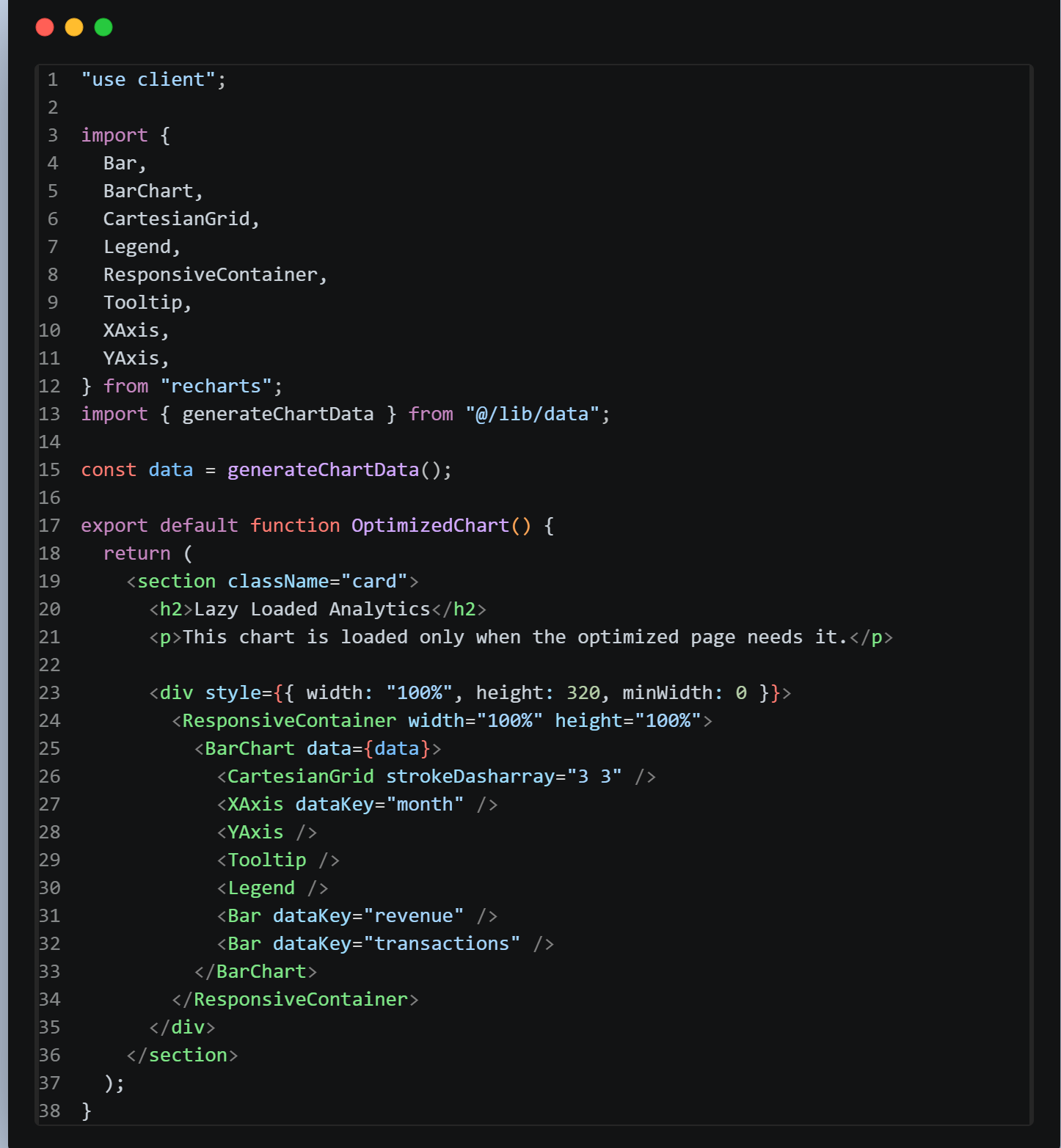
The important excerpt is:
<div style={{ width: "100%", height: 320, minWidth: 0 }}>
  <ResponsiveContainer width="100%" height="100%">
    <BarChart data={data}>
      {/* chart content */}
    </BarChart>
  </ResponsiveContainer>
</div>
What changed
style={{ width: "100%", height: 320, minWidth: 0 }}
The wrapper now has a clear height and width.
<ResponsiveContainer width="100%" height="100%">
The chart is instructed to fill the available space inside the wrapper.
Layout impact
|         Before                            |      After                         |
| ----------------------------------------- | -----------------------------------|
| Chart tries to measure unclear dimensions | Parent has stable dimensions       |
| Possible width/height warning             | Chart can calculate size correctly |
| Layout instability                        | More predictable rendering         |
This was not the biggest bundle optimization, but it improved correctness and layout stability.
Problem 7. Bundle Optimization With Dynamic Chart Loading
This was the biggest bundle-size win.
The heavy page imported the chart directly.
This is visible in the heavy main page image.
import HeavyChart from "@/components/HeavyChart";
The heavy chart imported multiple Recharts components.
import {
  Area,
  AreaChart,
  Bar,
  BarChart,
  CartesianGrid,
  Legend,
  Line,
  LineChart,
  ResponsiveContainer,
  Tooltip,
  XAxis,
  YAxis,
} from "recharts";
This means opening /heavy forces the browser to download the chart code and Recharts immediately.
Even if the user does not care about analytics, they still pay the cost.
Solution 7. Solving Bundle Weight With Lazy Chart Loading
The optimized page uses a dynamic import.
see full code here: Optimized Main Page.
const OptimizedChart = dynamic(() => import("@/components/OptimizedChart"), {
  ssr: false,
  loading: () => <div className="card skeleton" style={{ height: 320 }} />,
});
Then the chart is rendered only when requested:
{showChart ? <OptimizedChart /> : null}
What this does
dynamic(() => import("@/components/OptimizedChart"))
This tells Next.js to create a separate JavaScript chunk for the chart.
ssr: false
This prevents the chart from being server-rendered.
That is helpful because chart libraries often rely on browser layout behavior and client-side measurement.
loading: () => <div className="card skeleton" style={{ height: 320 }} />
This displays a placeholder while the chart code is loading.
{showChart ? <OptimizedChart /> : null}
This ensures the chart is not loaded until the user intentionally asks for it.
Bundle impact
| Before                      | After                         |
| -------------------------   | ----------------------------- |
| Page load includes Recharts | Page load excludes chart code |
| Chart loads even if unused  | Chart loads on demand         |
| Larger initial bundle       | Smaller initial bundle        |
This is called:
Code splitting + lazy loading
This was the biggest reason the optimized route became much smaller.
Reducing Re-render Scope
The heavy page managed too many responsibilities in one place.
It handled:
data
search
modal state
charts
table rendering
stats
When one state changed, React had to reconsider a large part of the component tree.
For example, opening the modal could cause filtering logic, table props, and child components to be revisited.
The optimized version separates responsibilities better.
OptimizedPage
 ├── StatsCards
 ├── Search section
 ├── OptimizedChart (lazy)
 ├── OptimizedUsersTable (memoized)
 └── UserModal (lazy)
This matters because each section now has a clearer role.
The chart is lazy-loaded.
The table is memoized.
The modal is lazy-loaded.
The callbacks are stable.
The filtered data is memoized.
The page becomes easier to reason about and cheaper to update.
Data Generation Strategy
The optimized page still uses client-side data generation.
This is visible in the optimized main page image.
const users = useMemo(() => generateUsers(5000), []);
This is better than generating users on every render.
The empty dependency array means the users are generated once when the component mounts.
But this still runs in the browser.
For a demo, that is acceptable.
For a real production dashboard, this is not ideal.
What I Would Do in Production 🌚
A production dashboard should avoid sending thousands of records to the browser upfront.
A better API design would look like this:
GET /api/users?page=1&size=50&search=bayDem
The backend should handle:
- pagination
- filtering
- sorting
- indexing
- authorization
Then the frontend only renders the current page of data.
For large datasets, the best strategy is usually a combination of:
server-side pagination
server-side filtering
frontend virtualization
lazy-loaded UI
Client-side filtering over 5,000 users is fine for a demo, but it does not scale well to 100,000 or 1,000,000 records.
Heavy Page vs Optimized Page
| Heavy Page                    | Optimized Page                       |
| ----------------------------- | ------------------------------------ |
| Loads everything upfront      | Loads only what is needed            |
| Renders every table row       | Renders only visible rows            |
| Computes scores during render | Precomputes scores when users change |
| Filters on every keystroke    | Filters after typing pauses          |
| Imports charts immediately    | Lazy-loads charts                    |
| Imports modal immediately     | Lazy-loads modal                     |
| Creates unstable callbacks    | Uses stable callbacks                |
| Larger initial bundle         | Smaller initial bundle               |
Key Takeaways
-
Bundle size matters
The biggest gain came from removing Recharts from the initial route bundle.
-
Virtualization is powerful
Rendering 20 visible rows is much cheaper than rendering 5,000 rows.
-
Render should be cheap
Expensive calculations should not run repeatedly inside render loops.
-
Debounce expensive interactions
Search should not filter thousands of records on every keystroke.
-
Stable props help memoization
useCallbackandReact.memowork better when props are stable. -
Lazy-load non-critical UI
Charts and modals should not always be part of the initial page load.
-
Move large data operations to the backend in production
Frontend optimization helps, but backend pagination and filtering are necessary for real scale.
Conclusion
This optimization was not about randomly adding useMemo, useCallback, or React.memo.
The real improvement came from changing the cost model of the page.
The heavy version did this:
Load everything
Render everything
Compute everything immediately
The optimized version does this:
Load only what is needed
Render only what is visible
Compute only when necessary
Delay heavy work until user intent is clear
That is the difference between a dashboard that only works in small demos and a dashboard that can scale better in real applications.